
LinkedIn Optimizely: A/B Testing Strategies for Marketers
TL;DR:
- LinkedIn Optimizely applies AI-powered experimentation to improve LinkedIn content and ad performance through structured testing. It enables continuous, automated workflows by integrating experimentation, personalization, and analytics for scalable optimization. Effective results depend on disciplined testing, strategic alignment, and integrating experiment data with broader marketing analytics.
LinkedIn Optimizely is the practice of applying Optimizely's AI-powered experimentation platform to LinkedIn content and advertising campaigns to drive measurable engagement and conversion gains. The standard industry term for this approach is AI-driven experimentation, and it sits at the intersection of LinkedIn's 1 billion+ member network and Optimizely's structured testing methodology. Optimizely One combines AI orchestration, personalization, and content management into a single platform, making it one of the most capable tools for marketers who want to move beyond guesswork on LinkedIn. Whether you are testing organic post hooks or paid ad creatives, the core principle is the same: change one variable, measure the result, and repeat at scale.
What is LinkedIn Optimizely and how does it work for marketers?
Optimizely One is an enterprise-grade platform built around three pillars: experimentation, personalization, and content management. Its AI layer, called Opal, orchestrates multi-step marketing workflows so that testing is not a one-off task but a continuous, automated process. For LinkedIn marketers, this means you can design structured test matrices, run them on a defined schedule, and feed results directly into your content strategy without rebuilding the process each time.
The scale of adoption tells you something important about where the market is heading. AI agent use on Opal jumped 42%, with nearly 1,700 customers using over 40 pre-built agents for tasks like search optimization and experimentation. That growth signals that marketers are moving from manual split testing to agent-driven workflows that run in the background while teams focus on strategy.
Optimizely also integrates with analytics platforms like Adobe Analytics, Google Analytics, and custom data pipelines. This matters for LinkedIn because organic post data and Campaign Manager ad data live in separate places. Pulling both into a unified experimentation view lets you draw conclusions across your full LinkedIn presence rather than optimizing paid and organic in isolation.
Key capabilities that apply directly to LinkedIn marketing:
- Opal AI agents automate repeated content generation and testing tasks, reducing the manual lift of running sequential experiments
- Personalization modules let you tailor LinkedIn landing page experiences based on audience segment data
- Experimentation dashboards track statistical significance so you know when a result is real, not noise
- Workflow orchestration chains content creation, scheduling, and analysis into a single repeatable process
Pro Tip: Before you connect Optimizely to your LinkedIn workflow, map out the three variables you most want to test in the next 90 days. Opal agents work best when given a defined scope rather than an open-ended brief.
How to run effective A/B tests on LinkedIn organic posts
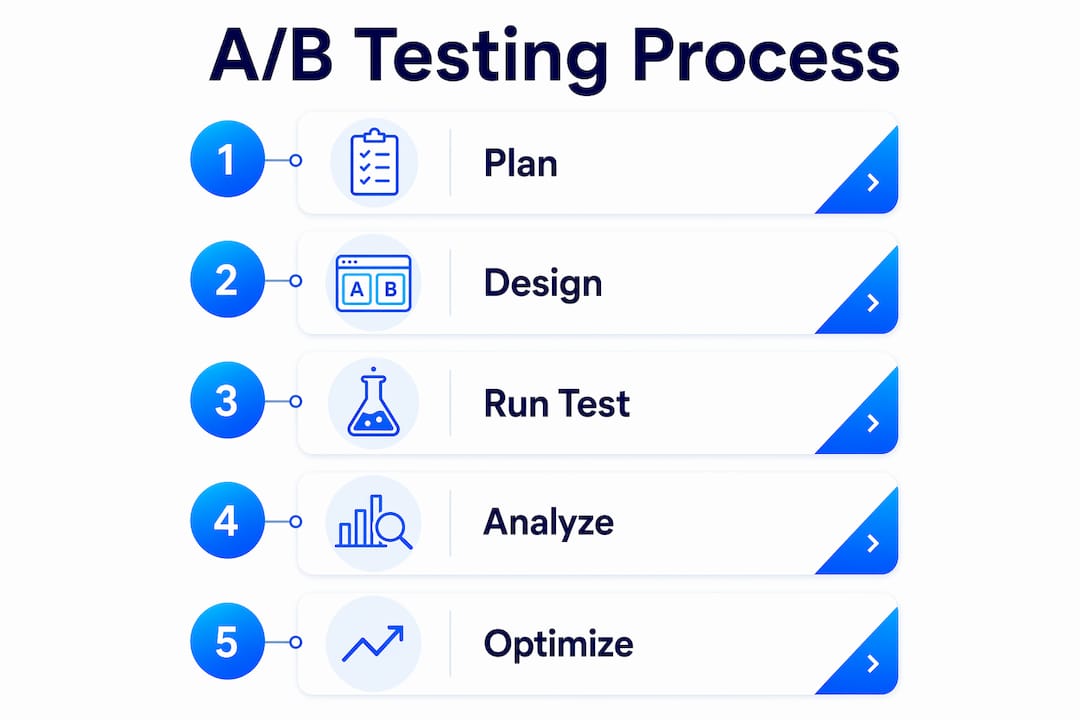
A/B testing organic LinkedIn content requires a different approach than paid split testing because you cannot serve two versions of a post to randomly split audiences simultaneously. Instead, you run sequential tests: publish version A, record its performance over a defined window, then publish version B to a comparable audience at a comparable time.
The most impactful variable to test first is the opening hook. Testing the first 10 to 15 words of a LinkedIn post is disproportionately impactful on reach and engagement, especially on mobile, where the feed truncates text before the "see more" prompt. A hook that stops the scroll in those first two lines determines whether the algorithm distributes your post broadly or buries it after the initial batch of impressions.
Here is a structured process for running organic LinkedIn A/B tests with Optimizely's methodology:
- Define one variable per test. Change the hook, the post format, or the call to action. Never change two at once or your data is uninterpretable.
- Set a minimum 7-day evaluation window. Seven-day testing windows capture late-stage reach boosts from saves and comments that arrive well beyond the initial 24-hour distribution spike.
- Record baseline metrics before you start. Pull your average impressions, engagement rate, and click-through rate for the past 30 days so you have a real comparison point.
- Publish at matched time slots. Test version A on a Tuesday at 9 a.m. and version B the following Tuesday at 9 a.m. to control for day-of-week and time-of-day effects.
- Log results in a shared test matrix. Opal agents can automate this step, but even a simple spreadsheet works. The goal is a running record of what you tested, what changed, and by how much.
- Apply the winning pattern to your next three posts. One data point is not a trend. Confirm the result before baking it into your LinkedIn content strategy.
Common variables worth testing beyond the hook include post length (short punchy posts versus long-form narratives), content format (text only versus image versus document carousel), and the placement and phrasing of your call to action. The A/B testing best practices that apply to landing pages transfer directly to LinkedIn posts: isolate variables, collect enough data, and resist the urge to call a winner early.
Pro Tip: LinkedIn's algorithm gives a secondary distribution boost to posts that accumulate saves. Test whether adding a direct "save this for later" prompt in your CTA increases saves and, by extension, total reach.
What are the best practices for LinkedIn ads A/B testing?
LinkedIn Campaign Manager has a native A/B testing feature, but it comes with hard requirements that many marketers underestimate. Campaign Manager requires a minimum 14-day duration and a $3,000 lifetime budget per ad set for lead generation tests, with at least 100 clicks or 50 conversions per variant before you can call a statistically valid winner. Running a test below these thresholds produces results you cannot trust.
The hierarchy for what to test matters as much as the mechanics. Creative content drives 70 to 80% of ad performance, which means your offer and creative should be tested before you touch audience targeting or ad format. Testing a weak offer against a different audience segment tells you nothing useful. Fix the offer first.
| Test priority | Variable | What to measure |
|---|---|---|
| 1 | Offer (lead magnet, demo, trial) | Conversion rate, cost per lead |
| 2 | Audience segment | Click-through rate, lead quality |
| 3 | Ad format (single image, video, carousel) | Engagement rate, view-through rate |
| 4 | Ad copy and headline | Click-through rate |
| 5 | Landing page | Conversion rate post-click |
Common pitfalls that invalidate LinkedIn ad tests:
- Running overlapping tests simultaneously. Two active tests targeting the same audience segment will cannibalize each other's impressions and corrupt both data sets.
- Calling winners before the data threshold. A variant with 30 conversions looks like a winner until the next 20 conversions flip the result.
- Changing the bid strategy mid-test. Budget pacing and delivery algorithms need time to stabilize. Changing them resets the learning period.
Connecting Optimizely's experimentation data to your Campaign Manager results gives you a cross-channel view that LinkedIn's native tools cannot provide on their own. You can see whether a landing page variant that wins in Optimizely also improves your LinkedIn ad conversion rate, which is a much stronger signal than either data source alone. For deeper guidance on landing page testing that complements your LinkedIn ad campaigns, the principles of single-variable control apply equally in both contexts.
How to integrate Optimizely data with your marketing analytics stack
Connecting Optimizely experiment data to your existing analytics platform is where many marketing teams lose efficiency. The integration method you choose directly affects your API usage, server-call costs, and the volume of experiments you can run before hitting overage charges.
Optimizely's Adobe Analytics integration offers three methods. The built-in integration fires one s.tl() call per experiment decision, which increases server call volume and associated costs at scale. The recommended approach is a custom eVar or prop integration via s.t() calls, which piggybacks experiment data onto existing analytics pageview calls rather than generating separate calls for each decision. This distinction matters enormously at enterprise scale. A program running 50 concurrent experiments across high-traffic LinkedIn landing pages can generate millions of additional server calls per month using the built-in method, while the custom approach adds near-zero incremental calls.
The practical implication is straightforward: careful integration design affects the scalability and cost-efficiency of your entire experimentation program. Teams that optimize their analytics architecture early can run three to four times more experiments within the same budget compared to teams using default settings.
Key integration decisions to make before you scale:
- Choose your data routing method before you launch more than five concurrent experiments
- Audit your server-call quota with your analytics vendor to understand your current baseline
- Tag experiment variants consistently across LinkedIn Campaign Manager, Optimizely, and your analytics platform so attribution is clean
- Build a shared reporting view that surfaces LinkedIn engagement data alongside Optimizely experiment outcomes in one place
Pro Tip: If you use Google Analytics 4 rather than Adobe Analytics, use Optimizely's custom event API to send experiment assignment data as a GA4 custom dimension. This keeps your event volume clean and preserves your free tier limits.
How to build a repeatable LinkedIn optimization workflow with AI agents
A one-off A/B test is a tactic. A repeatable optimization workflow is a system. The difference between marketers who see compounding LinkedIn growth and those who plateau is almost always the presence or absence of a documented, repeatable process.
Optimizely's Opal platform makes this practical. Opal AI agents allow marketers to automate multi-step workflows for LinkedIn content testing and optimization, enabling continuous improvement at scale rather than isolated experiments. Customers using these agents have saved over 4,000 hours, and the teams seeing the biggest gains are those who treat agents as workflow infrastructure rather than one-time shortcuts.
Here is a repeatable six-step workflow you can build with Opal and LinkedIn:
- Define your test matrix for the quarter. List the variables you will test, in priority order, with one variable per test cycle.
- Configure Opal agents to generate content variants. Give each agent a defined brief: same topic, same length, different hook or format.
- Schedule posts through LinkedIn's native scheduler or a third-party tool. Maintain consistent timing across variants to control for distribution variables.
- Set a 7-day evaluation window as a hard rule. Do not review results before day seven regardless of early signals.
- Pull results into your shared test log. Record impressions, engagement rate, click-through rate, and any conversion events tied to the post.
- Apply winning patterns to the next cycle and retire losing patterns. Update your LinkedIn content strategy document after every three completed tests.
The compounding effect of this approach is significant. Optimizely customers report 85% increased campaign production and 57% more asset reuse when using AI-driven content and workflow orchestration. Those gains come from the system, not from individual effort. Pair this with marketing automation integration to connect your LinkedIn test results to broader campaign triggers and you have a genuinely self-improving content engine.
Key takeaways
Effective LinkedIn optimization with Optimizely requires combining single-variable testing discipline, AI-driven workflow automation, and clean analytics integration to produce compounding, measurable results.
| Point | Details |
|---|---|
| Test the opening hook first | The first 10 to 15 words of a LinkedIn post determine mobile visibility and algorithm distribution. |
| Use 7-day minimum windows | Organic LinkedIn posts receive late engagement from saves and comments that skew results if you evaluate too early. |
| Meet LinkedIn ads thresholds | Campaign Manager tests require 14 days, $3,000 per ad set, and 100+ clicks per variant for valid results. |
| Optimize analytics integration | Custom eVar or prop integration via s.t() calls reduces server-call volume and scales your test program efficiently. |
| Build repeatable workflows | Opal AI agents automate multi-step test cycles, enabling 85% more campaign production across marketing teams. |
Why AI alignment matters more than the tools themselves
I have spent years watching marketing teams invest in platforms like Optimizely and then underuse them because the technology outpaced the team's process. The tool is not the constraint. The strategy and the discipline around it are.
The most common mistake I see is treating LinkedIn optimization as a series of disconnected experiments rather than a compounding system. A team runs a hook test, gets a result, and then moves on to a completely unrelated campaign without applying what they learned. Three months later, they are back to guessing. The alignment between AI technology and marketing strategy is what separates teams that see measurable outcomes from those that generate interesting data with no business impact.
My honest advice: start with two variables, not twenty. Test your hook against one alternative. Run it for seven days. Document the result. Apply it. Then test the next variable. The marketers who build a genuine learning culture around LinkedIn, where every post is a data point and every quarter produces a cleaner content strategy, are the ones who consistently outperform their peers. Optimizely's Opal agents and LinkedIn's Campaign Manager give you the infrastructure. The discipline to use them systematically is entirely yours to build.
Profile fundamentals also matter more than most experimenters admit. LinkedIn profiles with professional photos receive 14 times more views, and the first 200 to 300 characters of your About section determine whether anyone reads further. No amount of post-level experimentation compensates for a profile that fails at first impression. Optimize the foundation before you optimize the content.
— Juan
Start testing your LinkedIn content with Gostellar
If you want to apply these experimentation principles without the complexity of an enterprise platform, Gostellar is built for exactly that.

Gostellar's A/B testing platform runs on a 5.4KB script that adds no meaningful load time to your landing pages, which matters when your LinkedIn ads are driving traffic to pages where every second of delay costs conversions. The no-code visual editor lets you set up tests in minutes, and real-time analytics show you which variant is winning before your budget runs out. Whether you are a solo marketer or a growth team at a mid-sized company, start testing with Gostellar and build the same systematic experimentation discipline that enterprise teams use, without the enterprise overhead. You can also explore how Optimizely's no-code approach compares to Gostellar's workflow for your specific use case.
FAQ
What does LinkedIn Optimizely mean?
LinkedIn Optimizely refers to using Optimizely's AI-powered experimentation platform to run A/B tests and optimize LinkedIn content and ad campaigns for better engagement and conversion outcomes. It combines Optimizely's structured testing methodology with LinkedIn's organic and paid marketing channels.
How long should a LinkedIn A/B test run?
Organic LinkedIn post tests should run for at least seven days to capture late engagement from saves and comments. LinkedIn Campaign Manager ad tests require a minimum of 14 days and $3,000 per ad set before results are statistically reliable.
What variables should I test first on LinkedIn?
Test your opening hook first, specifically the first 10 to 15 words, since mobile truncation makes this the highest-impact variable for organic reach. For LinkedIn ads, test your offer before touching audience targeting, ad format, or copy.
Can Optimizely integrate with LinkedIn Campaign Manager?
Optimizely does not have a direct native integration with LinkedIn Campaign Manager, but you can connect experiment data through analytics platforms like Adobe Analytics or Google Analytics 4 to create a unified view of LinkedIn ad and landing page performance.
How do AI agents in Optimizely Opal help with LinkedIn marketing?
Opal AI agents automate multi-step workflows including content variant generation, scheduling, and results logging. Teams using these agents have saved over 4,000 hours and report 85% higher campaign production compared to manual processes.
Recommended
Published: 5/29/2026