
Manual Testing Websites: A 2026 Guide for QA Teams
TL;DR:
- Manual testing websites enable QA teams to find usability and exploratory issues that automation may miss. They support structured checklists, real-device testing, and integration with bug trackers, improving overall software quality. Proper evaluation and disciplined use of these platforms help teams deliver better user experiences and reliable releases.
Manual testing websites are specialized platforms and resources that enable QA professionals to perform structured, human-driven software validation without relying on automation scripts. These sites cover everything from test case management and bug tracking to real-device testing clouds and interactive practice environments. Professional QA standards recommend a living checklist exceeding 150 test cases organized by functional, UI/UX, accessibility, security, SEO, and cross-browser categories. That scope alone explains why choosing the right manual testing websites matters as much as choosing the right methodology.
What are manual testing websites and why do QA teams need them?
Manual testing websites serve as the operational backbone for QA teams that need to validate real user experiences. Unlike automated scripts, human testers catch nuanced usability failures, unexpected visual regressions, and edge cases that no test script anticipates. Manual testing catches issues that automated tools miss, particularly in usability and exploratory domains, keeping QA responsive to real user scenarios. That gap between automation coverage and actual user experience is exactly where manual testing websites deliver their value.
The industry term for this practice is "manual software testing," and it encompasses functional testing, exploratory testing, usability testing, and accessibility validation. Manual testing websites provide the infrastructure, checklists, and tooling that make this work repeatable and auditable. QA teams in Agile and DevOps environments rely on these platforms to run on-demand human validation alongside their automation pipelines, improving quality without slowing release cycles.
How do you choose the best manual testing websites for your QA needs?
Selecting the right website testing services starts with understanding what types of testing your project actually requires. Not every platform covers the same ground.

Key evaluation criteria
Use these criteria to assess any manual testing platform before committing:
- Testing types supported: Confirm the site covers functional, UI/UX, accessibility, and performance testing. A platform that only handles functional flows will leave accessibility gaps.
- Device and browser coverage: Real devices outperform emulators for catching touch behavior, font rendering, and network-specific bugs. Platforms offering real-device clouds give you more accurate results.
- Educational resources and practice environments: Sites with demo websites for practice let junior testers build skills without touching production systems.
- Integration with test management tools: Your chosen platform should connect to tools like TestRail for test case tracking and Jira for bug reporting. Disconnected workflows create documentation gaps.
- Community and support: Active forums and documentation reduce onboarding time and help testers solve edge-case problems faster.
| Evaluation criterion | What to look for |
|---|---|
| Testing type coverage | Functional, UI/UX, accessibility, security, SEO |
| Device and browser access | Real devices, not just emulators |
| Tool integrations | TestRail, Jira, or equivalent |
| Practice environments | Sandbox or demo sites for skill building |
| Documentation quality | Structured workflows, checklists, templates |
Pro Tip: Before signing up for any manual testing website, run a free trial on a real project flow. Platforms that feel clunky during a trial will slow your team down under deadline pressure.
Accessibility testing deserves special attention during evaluation. Automated tools detect only 30–40% of accessibility issues. That means manual testing with screen readers and keyboard navigation is not optional for teams pursuing WCAG compliance. Any platform you choose should support this workflow explicitly. For a deeper look at how web accessibility connects to SEO and compliance, the overlap is significant enough to treat both concerns in the same testing pass.
What categories of manual testing websites and tools exist?
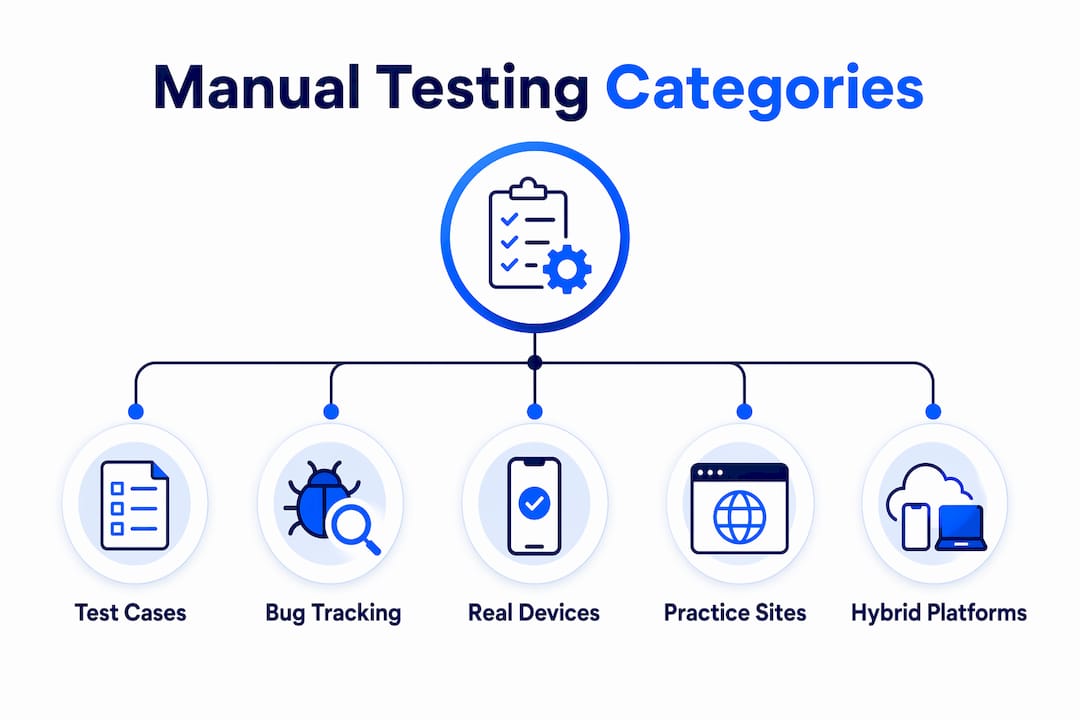
Manual testing software falls into five distinct categories, each serving a different part of the QA workflow.
Test case management platforms
These platforms let teams write, organize, and execute test cases with full traceability. TestRail is the most widely used example, offering test plan organization, execution tracking, and reporting. Teams use these platforms to maintain the structured test case libraries that professional QA standards require.
Bug tracking and issue reporting tools
Jira dominates this category. Testers log defects with screenshots, reproduction steps, and severity ratings. The best bug tracking tools integrate directly with test management platforms so every failed test case links automatically to a defect record. This connection keeps QA documentation clean and auditable.
Real-device testing clouds
BrowserStack offers manual testing on 3,500+ real devices and browsers, giving teams accurate cross-device validation that emulators cannot match. Real-device clouds are the correct choice for validating touch interactions, mobile-specific rendering, and network behavior on actual hardware. For cross-browser testing, these clouds eliminate the "works on my machine" problem entirely.
Interactive practice and demo sites
Practice environments let testers sharpen skills on intentionally broken or feature-rich demo applications. These sites are valuable for onboarding new QA team members and for testing exploratory techniques without risk to production systems.
Hybrid manual and automated platforms
Tools that merge manual test management with automation workflows give QA teams the best balance for comprehensive test coverage in complex projects. Katalon is one example that supports both manual test execution and automated script runs within the same interface.
| Category | Primary strength | Best use case |
|---|---|---|
| Test case management | Traceability and organization | Structured regression testing |
| Bug tracking | Defect lifecycle management | Reporting and prioritization |
| Real-device clouds | Accurate cross-device validation | Mobile and cross-browser QA |
| Practice environments | Skill development | Onboarding and exploratory training |
| Hybrid platforms | Manual and automated coverage | Complex, multi-sprint projects |
How to manual test websites: a step-by-step process
Effective manual testing follows a repeatable process. Improvised testing produces inconsistent results and missed defects.
-
Build your checklist first. Start with a prioritized test case list organized by P0 (critical), P1 (high), and P2 (medium) severity. Professional QA standards recommend 150+ test cases covering functional, UI/UX, accessibility, security, SEO, and cross-browser categories. Your checklist is your contract with the product.
-
Execute critical user flows. Manual testing systematically verifies form submissions, login flows, and checkout processes using both valid and invalid inputs. Test every error message. Confirm that form data reaches the CRM or email system on the backend.
-
Test navigation and error pages. Click every link. Verify 404 pages display correctly. Check that breadcrumbs and menus work on mobile viewports as well as desktop.
-
Validate cross-device and cross-browser behavior. Use a real-device cloud to run your critical flows on at least three browser and device combinations. Emulators miss rendering bugs that real hardware catches.
-
Capture and report every defect immediately. Log bugs with a screenshot, the exact reproduction steps, the expected result, and the actual result. Delayed reporting leads to incomplete defect records.
-
Run exploratory testing after scripted cases. Once the checklist is complete, spend dedicated time testing outside the script. Exploratory testing surfaces the unexpected failures that scripted cases never anticipate.
-
Collect qualitative data where possible. Real-user testing with heatmaps and usability scores adds qualitative insight that no functional test can replicate. Even a small sample of real users reveals friction points that testers overlook after repeated exposure to the same flows.
Pro Tip: Rotate testers on the same feature across sprints. Familiarity breeds blind spots. A fresh tester on a known flow will find defects the original tester stopped seeing.
What are the biggest challenges with manual testing websites?
Manual testing is effective but not without real operational risks. Understanding these challenges lets you build workflows that minimize their impact.
Human error under time pressure is the most consistent risk in manual testing. Manual testing is more error-prone under time pressure, which is why focusing manual efforts on exploratory and medium-priority tests after automation covers critical paths is the correct approach. Rushing a tester through a 150-case checklist the day before release produces false confidence, not quality assurance.
Accessibility gaps are a structural problem for teams that rely on automation alone. Since automated tools detect only 30–40% of accessibility issues, manual testing with assistive technologies like NVDA, JAWS, or VoiceOver is mandatory for any site targeting WCAG 2.1 compliance. Skipping this step is a compliance risk, not just a quality risk.
Balancing manual and automated coverage requires deliberate prioritization. QA expert Pramod Dutta recommends automating P0 tests first, then P1 tests, and reserving manual testing for exploratory and P2 cases. This layered approach prevents teams from wasting manual testing hours on repetitive regression cases that a script handles better.
Best practices that consistently improve manual testing outcomes:
- Maintain a single, version-controlled test case library rather than spreadsheets scattered across team members.
- Document every test execution, including passed cases, not just failures.
- Treat accessibility and SEO checks as unified quality concerns rather than separate workstreams, since structural site problems affect multiple quality scores at once.
- Use a QA checklist adapted for your team's release cadence to keep testing consistent across sprints.
Manual testing websites are indispensable for catching issues that automated tests miss, particularly in usability and exploratory domains. The teams that treat manual testing as a complement to automation, not a fallback, consistently ship better software.
Key Takeaways
Manual testing websites work best when QA teams combine structured checklists, real-device validation, and exploratory testing alongside a disciplined automation strategy.
| Point | Details |
|---|---|
| Use a prioritized checklist | Organize 150+ test cases by P0, P1, and P2 to guide every testing session. |
| Choose real-device platforms | Real-device clouds catch rendering and interaction bugs that emulators miss. |
| Automate critical paths first | Reserve manual effort for exploratory and medium-priority cases after automation covers P0 and P1. |
| Test accessibility manually | Automated tools cover only 30–40% of accessibility issues; manual checks with assistive tech are required. |
| Document every execution | Log passed and failed cases to maintain an auditable, trustworthy QA record. |
Why I think most QA teams underuse manual testing websites
After years of working across QA workflows in Agile and DevOps environments, the pattern I see most often is this: teams invest heavily in automation frameworks, then treat manual testing as the thing they do when automation breaks. That is backwards.
Manual testing websites, used deliberately, are where you find the defects that matter most to real users. A script cannot tell you that a checkout flow feels confusing. A real tester can. The best QA teams I have worked with treat exploratory testing sessions on real-device clouds as non-negotiable sprint ceremonies, not optional extras.
The other thing I have learned is that real-device testing is not a luxury. Emulators are useful for quick checks, but they consistently miss the touch behavior and font rendering issues that users actually encounter. If your team is not running manual flows on physical devices before major releases, you are shipping with a known blind spot.
The future of manual testing is not replacement by automation. It is specialization. Manual testers in modern teams focus on usability, accessibility, and exploratory validation, the areas where human judgment is irreplaceable. Teams that recognize this shift and invest in the right web UI testing workflows will consistently outperform teams that treat manual testing as a cost to minimize.
— Juan
How Gostellar supports QA teams with website testing
QA teams that want to connect manual testing workflows with real performance data need a platform that handles both without adding complexity.

Gostellar gives QA teams and marketers a single environment to run A/B tests, track real user behavior, and validate website changes with real-time analytics. The platform's no-code visual editor means testers can set up experiments and goal tracking without writing a line of code. For teams using manual and automated testing together, Gostellar's lightweight 5.4KB script keeps performance impact minimal while delivering the behavioral data that manual testing alone cannot capture. It is the practical next step for QA teams that want their manual testing insights to drive measurable improvements.
FAQ
What is manual testing in website QA?
Manual testing in website QA is the process of a human tester executing test cases without automation scripts to verify functionality, usability, and accessibility. It covers user flows like form submissions, login, and checkout using both valid and invalid inputs.
What are the best manual testing tools for QA teams?
TestRail for test case management, Jira for bug tracking, and BrowserStack for real-device cross-browser testing are the most widely used manual testing tools in 2026. Each serves a distinct part of the manual testing workflow.
How does manual testing differ from automated testing?
Manual testing relies on human judgment to catch usability, exploratory, and accessibility issues that scripts miss. Automated testing handles repetitive, high-volume regression cases faster and more consistently than a human tester can.
Why is manual accessibility testing still required?
Automated accessibility tools detect only 30–40% of accessibility issues. Manual testing with screen readers and keyboard navigation is required to achieve full WCAG compliance and catch the defects automation cannot identify.
How many test cases should a manual testing checklist include?
Professional QA standards recommend a checklist of 150+ test cases organized by functional, UI/UX, accessibility, security, SEO, and cross-browser categories, prioritized by P0, P1, and P2 severity levels.
Recommended
Published: 7/15/2026