
PTaaS: smarter ways to optimize UX and conversions
TL;DR:
- Performance testing has become more accessible and affordable with cloud-based PTaaS, enabling SMBs to achieve significant performance gains without complex infrastructure. PTaaS allows on-demand, realistic load testing integrated into development workflows, resulting in faster identification and resolution of website bottlenecks. This shift empowers marketing and product teams to rapidly validate performance improvements, enhancing user experience and conversion rates efficiently.
Performance testing used to be locked behind expensive infrastructure, specialized engineers, and weeks of setup time — a barrier that kept most small and medium-sized businesses from taking it seriously. That changes with performance testing as a service (PTaaS). Cloud-based PTaaS solutions have helped SMBs achieve 40 to 95% performance gains without the capital expense of building testing infrastructure in-house. For marketing and product managers who need fast, reliable site performance to protect campaign ROI and user experience, PTaaS is no longer a luxury. It's a practical, accessible tool you can start using this week.
Table of Contents
- What is performance testing as a service (PTaaS)?
- How PTaaS boosts user experience and marketing results
- Key features to look for in a PTaaS provider
- In-house vs outsourced PTaaS: Which is best for your team?
- Advanced PTaaS trends: AI, shift-left, and CI/CD integration
- The real PTaaS edge for SMB marketers and product teams
- Ready to see faster results with performance testing as a service?
- Frequently asked questions
Key Takeaways
| Point | Details |
|---|---|
| SMB-ready solutions | Cloud-based PTaaS makes high-impact testing affordable and accessible for small teams. |
| Boosts user experience | PTaaS rapidly identifies and addresses performance bottlenecks, reducing page load times and errors. |
| Drives higher conversions | Faster, smoother sites raise campaign ROI and lower bounce rates, directly impacting revenue. |
| Choose the right provider | Look for platform flexibility, easy integrations, and expert support when selecting a PTaaS solution. |
| Outsource for speed | Outsourcing PTaaS lets teams skip infrastructure headaches and see faster results, ideal for infrequent but business-critical tests. |
What is performance testing as a service (PTaaS)?
PTaaS delivers on-demand performance testing through the cloud. Instead of buying servers, hiring specialized QA engineers, and managing complex test environments, you access a managed platform that handles all the infrastructure for you. You define the test scenarios, set the user load, and the service runs your test, collects results, and delivers reports.
This model is fundamentally different from traditional performance testing, which required dedicated hardware, months of configuration, and deep technical expertise just to run a basic load test. PTaaS removes every one of those barriers. You can simulate thousands of concurrent users hitting your product page, checkout flow, or landing page, all from a browser interface.
The performance load testing basics come down to understanding how your system behaves under real-world stress. PTaaS makes that process accessible by abstracting the technical complexity. Popular tools and platforms in this space include providers like BlazeMeter, which scales to millions of virtual users and starts at $149 per month, PFLB with its AI-powered analysis, Gatling Enterprise, k6 Cloud (which is roughly 3x more memory efficient than JMeter), and LoadRunner Cloud. Each has a different strength, but all share the core PTaaS benefit: you test on demand, without owning the infrastructure.
For SMBs specifically, the most common use cases are:
- Pre-campaign launches: Test your landing pages under projected traffic before a paid ad campaign goes live
- Peak event preparation: Simulate Black Friday or product launch traffic spikes to find bottlenecks before they cost you sales
- Checkout optimization: Identify exactly where your purchase funnel slows down under load
- Post-deployment validation: Confirm that a new feature or update didn't quietly degrade page speed
You can also leverage web performance testing for CRO workflows, connecting test results directly to your conversion rate optimization strategy.
Pro Tip: Most PTaaS platforms offer native integrations with tools like Jenkins, GitHub Actions, and Slack. Set up a one-click test trigger inside your deployment workflow so every code push automatically gets a quick performance check — no engineer required.
How PTaaS boosts user experience and marketing results
Once you understand what PTaaS is, the next question is straightforward: does it actually move the needle? The answer, backed by real-world data, is yes — often dramatically.
Consider this: e-commerce performance testing reduced checkout time from 15 seconds to 2.5 seconds and cut error rates from 18% to under 2.5% at 5,000 concurrent users. The same retailer handled 108 million transactions per hour with zero downtime after optimizing based on test findings. For a marketing team running a time-sensitive promotion, those numbers translate directly into revenue that doesn't leak out of a slow or broken checkout flow.

Here's a practical overview of how PTaaS improvements map to marketing and UX outcomes:
| Performance issue | PTaaS finding | Business impact |
|---|---|---|
| Slow checkout (15s) | Bottleneck in payment API | Cart abandonment drops after fix |
| High error rate (18%) | Server overload at 3k users | Error rate falls to under 2.5% |
| Landing page slow load | CDN misconfiguration | Bounce rate improves, ad ROI rises |
| Mobile checkout lag | Third-party script blocking | Session duration increases |
The relationship between ecommerce optimization and page speed is not subtle. Slow pages cost you conversions, and PTaaS gives you the precise data to fix the right thing fast.
"Performance is a feature. When your users have to wait, they make a choice — and that choice is often your competitor."
Here's a repeatable sequence marketing and product teams can use to leverage PTaaS effectively:
- Define your critical user journey — identify the pages or flows that matter most to campaign success (landing page, add to cart, checkout)
- Set a realistic load scenario — base your virtual user numbers on your actual traffic projections, not worst-case fiction
- Run your baseline test — establish current performance benchmarks before any changes
- Identify and fix bottlenecks — work with your dev team on the specific issues PTaaS surfaces (database queries, third-party scripts, server configs)
- Retest and validate — confirm the fix worked under the same load conditions
- Schedule ongoing tests — automate pre-launch checks so performance doesn't regress silently
This approach to conversion techniques for speed ensures you're not guessing about what to fix. You're acting on evidence.
Key features to look for in a PTaaS provider
Understanding the benefits leads to the next critical question: how do you pick the right PTaaS service for your specific needs?
Not every provider is built the same way, and choosing the wrong one can mean paying for features you don't need or missing capabilities that would actually help. Multi-tool support, geo-distributed load generation, and DevOps integration are the features that separate effective providers from mediocre ones — and you should validate any provider through a proof-of-concept test before committing.
Here's a quick comparison of major PTaaS providers to guide your evaluation:
| Provider | Best for | Notable strength | Pricing entry |
|---|---|---|---|
| BlazeMeter | Teams already using JMeter/Gatling | Scales to millions of VUs | $149/month |
| k6 Cloud | Developer-friendly teams | Memory efficient, CI/CD ready | Free tier available |
| PFLB | AI-driven analysis | Auto-detects bottlenecks | Custom pricing |
| Gatling Enterprise | High-accuracy load testing | Realistic traffic simulation | Custom pricing |
| LoadRunner Cloud | Enterprise-grade testing | Broad protocol support | Subscription based |
When evaluating providers, look for these must-have capabilities:
- Multi-tool support: Can you run tests with JMeter, k6, or Gatling based on your team's preferences?
- Geo-distributed load generation: Can you simulate users from the regions where your customers actually live?
- DevOps and CI/CD integration: Does it plug into GitHub Actions, Jenkins, or your existing deployment pipeline?
- Transparent pricing: Are you paying per virtual user, per test run, or a flat monthly fee? Make sure the model fits your usage pattern.
- Real-time dashboards: Can your team see results as the test runs, not hours later?
- Proof-of-concept availability: Does the provider let you run a trial test before you sign a contract?
For marketing teams managing traffic surge scenarios, geo-distributed testing is especially important. If your customers are in Chicago and New York, testing from a single data center in Virginia gives you a distorted picture. Accurate geographic simulation leads to more reliable fixes.
In-house vs outsourced PTaaS: Which is best for your team?
Choosing a provider is only one side of the coin. Should you outsource the entire testing process, run it in-house, or blend both? Here's how to decide.
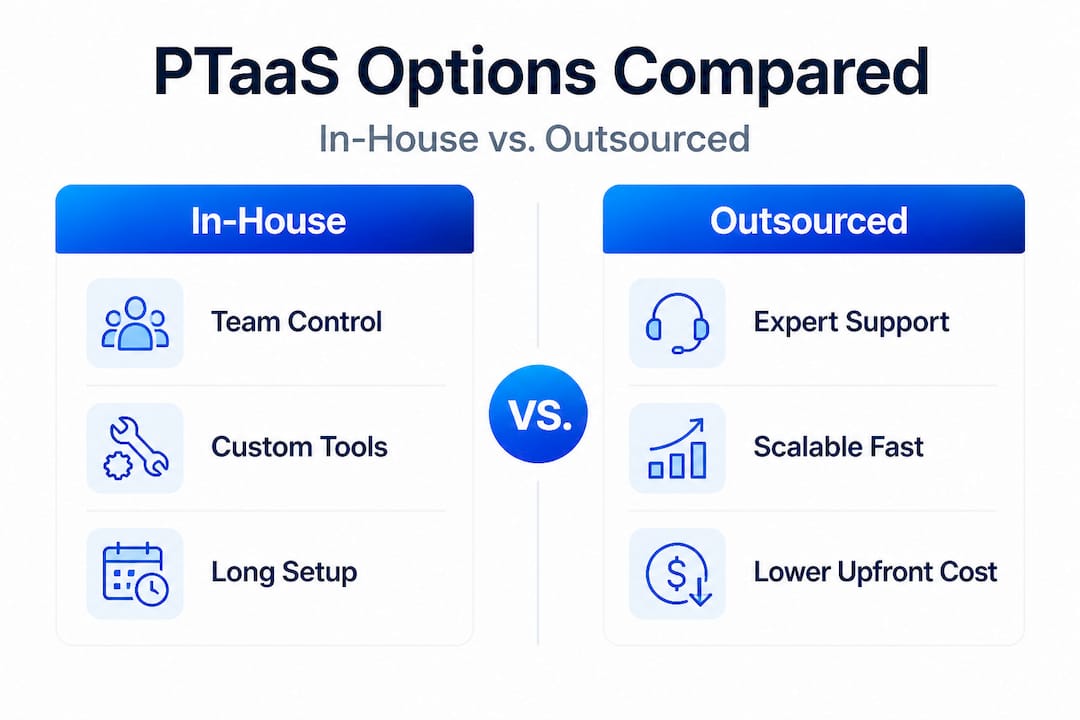
Outsourced PTaaS offers expert guidance, full scalability without infrastructure management, and faster ROI for SMBs running infrequent tests or preparing for specific peak events. The downside is that external teams have less intimate knowledge of your application's quirks and business logic. In-house testing gives your team deep context and enables continuous integration, but it demands specialized skills, higher ongoing costs, and complex toolchain setup. A hybrid approach tends to work best for larger or more complex platforms.
For most SMBs, here's the practical breakdown:
Choose outsourced PTaaS if:
- You test performance infrequently (quarterly or for specific events)
- You don't have in-house QA engineers with load testing experience
- You need to spin up capacity for a single campaign launch or peak event
- Your priority is speed to insight, not building internal capability
Choose in-house if:
- You run tests continuously as part of your development cycle
- Your engineering team already knows tools like k6 or JMeter
- You have the internal budget to support ongoing tooling and upskilling
Consider a hybrid model if:
- Your platform is complex with many interdependent services
- You want in-house engineers running routine tests while outsourcing deep analysis
- You're in a regulated industry with strict data handling requirements
Pro Tip: SMBs consistently see faster ROI with pay-per-use outsourced PTaaS for their first 12 to 18 months. Once you understand your performance patterns and common failure points, you can evaluate whether building in-house capability is worth the investment. Start lean and test smarter, not harder.
The economics also favor outsourcing at early stages. A marketing-focused approach to performance confirms that SMBs who prioritize outcome over process get to results faster. Outsourced PTaaS keeps your product and marketing teams focused on interpreting results, not managing test infrastructure. And when you're ready to boost performance further, combining PTaaS results with structured A/B testing creates a powerful feedback loop for continuous improvement.
Advanced PTaaS trends: AI, shift-left, and CI/CD integration
To fully future-proof your approach, let's look at where PTaaS is heading and which features can help you get more value with less effort.
The most impactful trend is the shift-left approach, which means embedding performance testing earlier in the product lifecycle, even before a feature reaches staging. Rather than discovering that a new checkout widget slows your page by 3 seconds the night before launch, you catch it in development where it's cheap to fix. AI enhancements in newer PTaaS platforms accelerate analysis by automatically flagging which bottlenecks to prioritize, preventing the false positives that waste engineering time on non-issues.
Key innovations reshaping PTaaS in 2026:
- AI-powered bottleneck detection: Platforms like PFLB use machine learning to identify root causes faster than manual analysis, cutting time-to-fix from days to hours
- Shift-left testing: Integrating performance tests into early development stages means problems get caught before they affect production, not after a failed campaign
- CI/CD pipeline automation: Tools like k6 and BlazeMeter connect directly to GitHub Actions and Jenkins, automatically triggering performance checks on every code push
- Realistic scenario modeling: Modern platforms generate traffic patterns based on actual user behavior data rather than simplistic linear ramp-ups, giving you results that reflect reality
- Instant reporting dashboards: AI-generated summaries translate technical test results into plain-language recommendations that marketing managers can actually use
The CI/CD integration piece deserves special attention for product managers. When performance tests run automatically in your deployment pipeline, you break the cycle of "we'll test performance after launch." That reactive mindset is what causes the horror stories: a paid campaign driving traffic to a landing page that falls over under load.
The real PTaaS edge for SMB marketers and product teams
Here's the honest take that most performance testing articles skip over: the technical capabilities of PTaaS matter less than what they enable organizationally.
The real game-changer is not that PTaaS can simulate 5 million virtual users. It's that a marketing manager or product owner can now run a meaningful performance test without filing a ticket, waiting for a QA engineer, or understanding what a JMeter script looks like. That shift in access is enormous for SMBs.
Larger organizations have dedicated QA teams, performance engineers, and internal tooling. Historically, SMBs had to either skip performance testing or wait weeks for IT to fit it into their backlog. PTaaS removes that bottleneck entirely. Your marketing team can schedule a load test for Monday morning before a Tuesday campaign launch. Your product manager can validate a new feature under realistic traffic in an afternoon.
This creates a completely different pace of iteration. Instead of optimizing UX and performance on a quarterly cycle, you can run a test, surface a problem, fix it, and retest in under a week. That velocity is a genuine competitive advantage when you're competing for the same customers as larger, slower-moving organizations.
We've seen this pattern play out repeatedly in ecommerce optimization: the businesses that win on experience are not always the ones with the biggest budgets. They're the ones that test fastest, learn fastest, and ship fixes fastest. PTaaS is the infrastructure that makes that speed possible for teams without a performance engineering department.
The counterintuitive insight is this: performance testing is not a technical function. It's a business intelligence function. It tells you where your website fails your customers, and that's information your marketing and product teams can act on right now.
Ready to see faster results with performance testing as a service?
If PTaaS gives you the performance data, A/B testing gives you the conversion intelligence to act on it. Running both together creates a feedback loop that's hard to beat: optimize your site speed with PTaaS, then use structured experimentation to discover which page elements convert the traffic you've worked hard to retain.

Stellar makes that second step effortless. Built specifically for marketers and product managers at SMBs, Stellar's lightweight A/B testing platform adds only 5.4KB to your page weight, so your performance gains stay intact. You can set up experiments without writing a single line of code, track real-time results, and make confident decisions faster. Pair it with the performance testing fundamentals you've built with PTaaS, and you have a full-stack optimization practice running inside a lean, non-technical team.
Frequently asked questions
How does PTaaS reduce costs compared to traditional performance testing?
PTaaS eliminates hardware purchases and complex setup fees by delivering testing through the cloud, so you only pay for what you actually use. Pay-per-use PTaaS models help SMBs avoid capital expenditure while achieving 40 to 95% performance improvements.
What user experience issues can PTaaS help solve?
PTaaS identifies slow load times, server bottlenecks, and error spikes under realistic traffic conditions, so you can fix problems before they hit real customers. In documented cases, checkout time dropped from 15s to 2.5s and error rates fell from 18% to under 2.5% after acting on PTaaS findings.
Are PTaaS solutions secure enough for sensitive business data?
Reputable providers use encrypted connections and can isolate your test environment from production data, but you should always review compliance documentation specific to your industry before running tests that involve sensitive user information.
How quickly can an SMB start using PTaaS?
Most providers offer cloud-based sign-up with immediate access, and you can run your first simple load test within a day. Platforms like BlazeMeter start at $149 per month and scale to millions of virtual users, making them practical for businesses at almost any stage.
Recommended
Published: 5/1/2026